All templates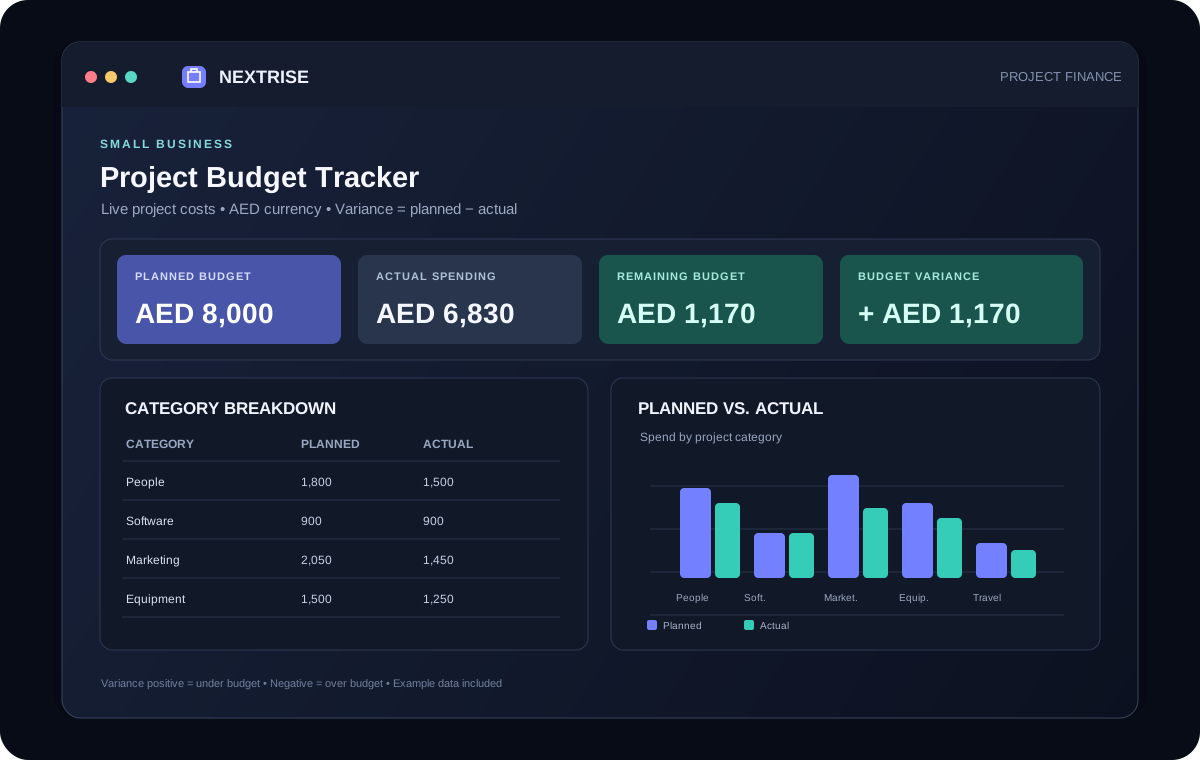
SMALL BUSINESS
Project Budget Tracker
Track planned and actual project costs, spot overruns early, and review your budget in a live AED dashboard.
Free Excel TemplateWhat is inside
A practical setup, ready to make your own.
- Compare planned costs with actual spending and spot overspending early.
- Review remaining budget and savings by category in the dashboard.
- Change the default AED number format to a currency that suits your project.
Workbook sheets: Budget Overview · Expense Tracker · Instructions
Made for
Useful for people who need a clearer workflow.
- Project managers
- Freelancers
- Small-business owners
- Event planners
Getting started
How to use this template
- Replace the sample rows in Expense Tracker with your own categories and expenses.
- Enter planned and actual amounts, due dates, and a status; use the category and status dropdowns.
- Review Budget Overview: positive variance means under budget; negative means over budget.
- To change currency, select the amount cells and edit their number format as described in Instructions.